Sales with product categories
Review the product category mapping functionality, its setup, and maintenance
This section provides instructions for a feature not enabled by default. Submit a request to Codat to activate the categorization mapping feature.
Product categories are used to track the types of items a merchant has been selling. For Codat’s SyncSync The process of fetching the latest data from a connected data source. Syncs can be triggered manually or run automatically on a schedule. for Commerce clients, we support syncing product categorization data into a merchant’s accounting software.
This functionality is available for categorizing sales data and facilitates automated bookkeeping based on these categories.
Sales categories in the SyncSync The process of fetching the latest data from a connected data source. Syncs can be triggered manually or run automatically on a schedule. Flow
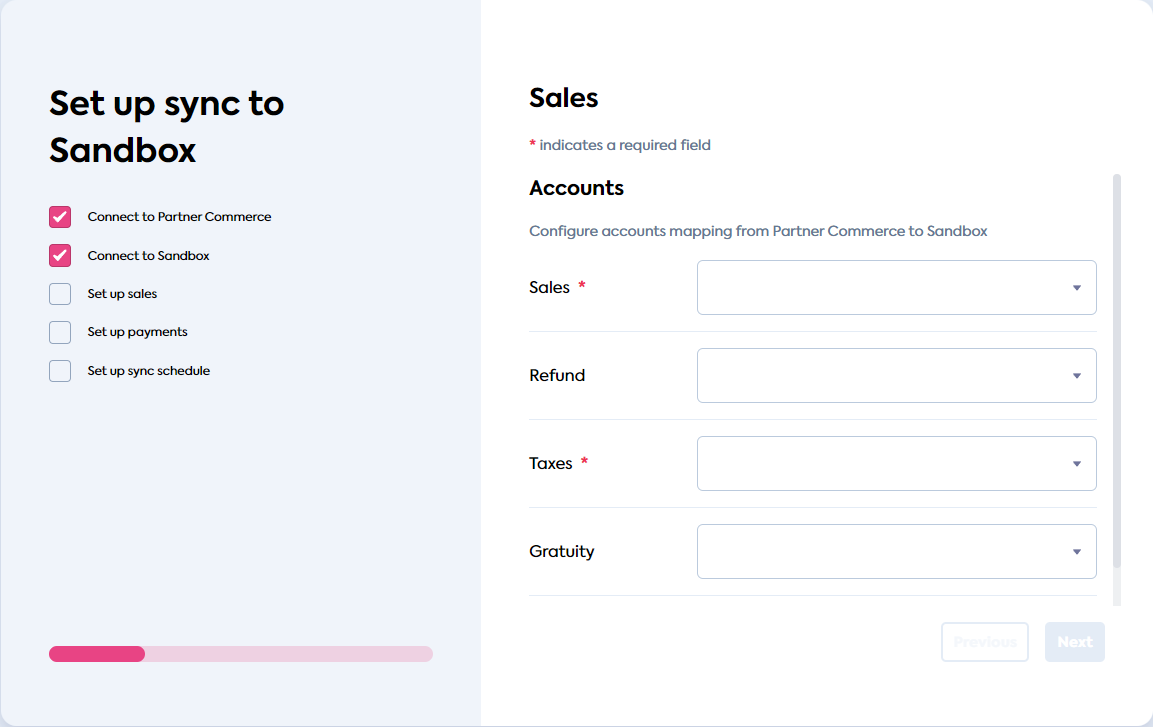
Before the feature switch is toggled on, the SyncSync The process of fetching the latest data from a connected data source. Syncs can be triggered manually or run automatically on a schedule. Flow UI displays a Sales category, along with Refund, Taxes, and Gratuity. These are standard available mapping categories of SyncSync The process of fetching the latest data from a connected data source. Syncs can be triggered manually or run automatically on a schedule. for Commerce.
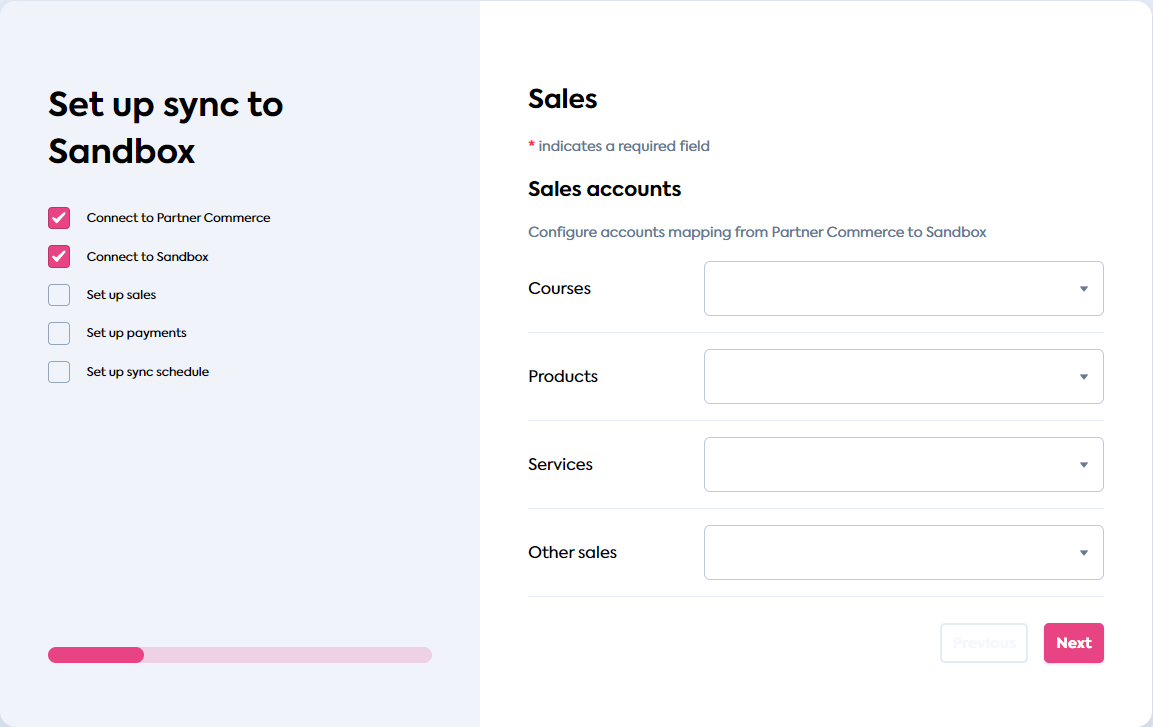
Once you enable the feature, an additional category mapping page is added to the SyncSync The process of fetching the latest data from a connected data source. Syncs can be triggered manually or run automatically on a schedule. Flow. It replaces the Sales category with a breakdown of mapping options for each product category you created. We also provide a catch-all “Other sales” category that does not need to be created separately.
In this example, we break down sales into courses, products, and services.
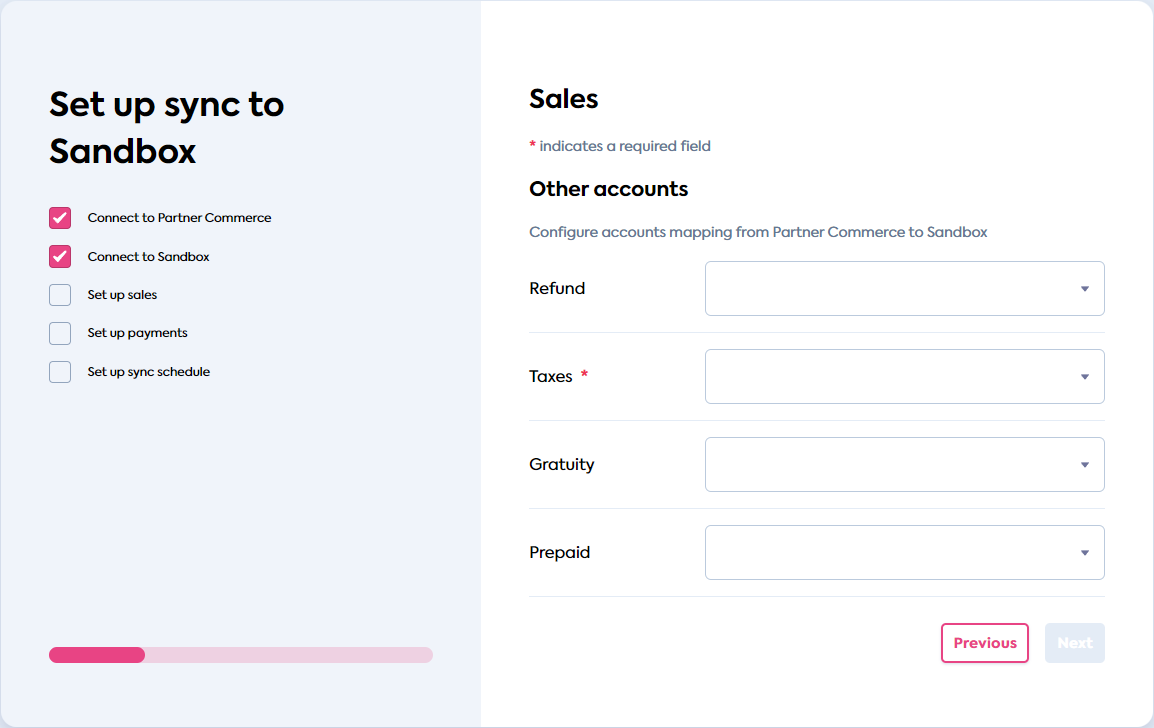
The account mapping page for standard categories is available on the next page of the SyncSync The process of fetching the latest data from a connected data source. Syncs can be triggered manually or run automatically on a schedule. Flow. It does not have a “Sales” mapping anymore, superseded by “Other sales” on the previous screen. The same categorization is also available in the SyncSync The process of fetching the latest data from a connected data source. Syncs can be triggered manually or run automatically on a schedule. Flow settings.
Configure sales categories
Ensure the categorization mapping feature has been enabled for your client.
Then, create the product categories that you want to use for splitting sales data. To do so, use the /companies/{companyId}/data/commerce-productCategories endpoint with the PUT method.
For example, in order to create categories to break down sales into products, services, and courses, the following request body needs to be sent:
{
  "ContractVersion": "9.3.1",
  "ProductCategories": [
    {
      "id": "prods",
      "name": "Products"
    },
    {
      "id": "serv",
      "name": "Services"
    },
    {
      "id": "cours",
      "name": "Courses"
    }
  ]
}
SyncSync The process of fetching the latest data from a connected data source. Syncs can be triggered manually or run automatically on a schedule. for Commerce does not support hierarchies of categories and requires a simple array of category IDs and names.
If you are using the visibleAccounts feature, ensure to add sales-accounts-sales-other to the list of visible accounts. This is to make “Other sales” mapping visible and configurable.
If you are using the visibleAccounts feature and some of your companies do not have product categories created, ensure to add sales-accounts-sales to the list of visible accounts.
💡 Tips and traps
- If you do not create any product categories after activating the feature, and then invoke the SyncSync The process of fetching the latest data from a connected data source. Syncs can be triggered manually or run automatically on a schedule. Flow UI, the additional categorization page will not be displayed.
- If you create, map, and subsequently delete a category, it will no longer appear in the SyncSync The process of fetching the latest data from a connected data source. Syncs can be triggered manually or run automatically on a schedule. Flow UI. However, account mapping will still exist in the companyCompany In Codat, a company represents your customer's business entity. Companies can have multiple connections to different data sources. configuration.
- Once you introduce the product categories for a companyCompany In Codat, a company represents your customer's business entity. Companies can have multiple connections to different data sources., the previous Sales mapping will appear as “Other sales” mapping instead.
Customize category labels and text
To make a change in a product category label, amend the product categories using the /companies/{companyId}/data/commerce-productCategories endpoint, same as when you created them.
You can change the label for “Other sales” mapping using the configure-content-sales-accounts-entries-sales-other key.
The titles of the product categorization pages (named “Sales accounts” and “Other accounts” once the feature is toggled on) cannot be customized. The descriptions of the additional and existing account mapping pages cannot be customized separately.