Xero mapping specification
Guidelines for data mapping configuration from a commerce software to Xero.
Overview
This document provides guidelines for data mapping configuration from a commerce software to Xero.
In Codat's SyncSync The process of fetching the latest data from a connected data source. Syncs can be triggered manually or run automatically on a schedule. flow, the data types are grouped under the three features:
Sales
The Sales feature represents all sales made in the course of a companyCompany In Codat, a company represents your customer's business entity. Companies can have multiple connections to different data sources.’s normal business activities during a set period of time.
To set up Sales using the Codat SyncSync The process of fetching the latest data from a connected data source. Syncs can be triggered manually or run automatically on a schedule. for Commerce UI flow, a merchant needs to complete the following steps:
- Select the accounts for Sales, Refunds, Gratuity, and Prepaid features from the respective dropdown lists. The lists display all the applicable accounts available on the merchant’s Xero accounting software.
- Select the tax rates that they wish to apply to the data they are sending.
- Select the preferred status for invoices representing the Sales data within their accounting software.
The grouping period is set to daily by default.
Sales account mapping
Sales
Sales are booked on a nominal account of the Xero type Revenue. This is the account that the merchant would typically use to book their sales. The merchant can select an existing account from Xero. If an account is not available, it needs to be created in Xero for this purpose.
To represents the sales made over the course of the day, Codat writes a single daily sales invoice to Xero.
The invoice is issued to the commerce services provider.
It contains a line item for each tax rate. Each line item represents the total of all sales at the given tax rate.
If no sales have been made at a given tax rate on that day, the corresponding line item will be omitted.
Discounts are applied to the total of the purchase once all the items have been summed up rather than at an item level. As we are splitting out items into VAT percentages across all sales for the day, discounts need to be applied at the item level which may lead to slight rounding discrepancies compared to applying the discount at the summed level. As per the advice of most accounting software, we add an invoice line of ± 0.01 to bring the total in line with the correct total.
When the merchant receives payment for the reported sales, the invoice is marked as paid and is balanced by the merchant’s holding account (also known as a clearing or a liquid account) for the respective payment type.
To learn more about the configuration of Payments, navigate to the Payments section.
Refunds
Refunds represent a catch-all for all refunds, cash or non-cash.
Similar to Sales, Refunds are usually booked on a nominal account that the merchant uses to book their revenue, of the Xero type Revenue.
Typically, merchants would write Sales and Refunds into the same account. However, they can use a different account if they wish to report them separately.
When purchase refunds are recorded in Xero, the negative revenue will be booked to the selected account.
Codat writes a single sales credit note to Xero daily to represent all refunds made over the course of that day. The credit note contains one line item for each tax rate, with this line item representing the total of all refunds at that tax rate.
If no refunds have been made for a given tax rate on that day, the corresponding line item will be omitted.
Codat writes refund payment data as cash refunds.
For each payment type refunded, a transaction is recorded against the credit note. This refund is taken from the selected account to receive Payments for each payment type (card, cash, etc).
Gratuity
Gratuity represents tips collected by the merchant from their customers on payment.
Depending on the merchant’s preference, Gratuity can be booked in a Revenue or a Liability account.
Gratuity is written to Xero as part of the daily sales invoice as a separate line item.
Prepaid
The Prepaid feature includes the transactions pertaining to selling and redeeming prepaid items, such as gift cards.
Transactions of the type Prepaid should be booked into a Liability account.
The purchase of prepaid items will appear as a line item on the daily Sales invoice in Xero.
Note that when a customer uses the prepaid item (for example, purchases an item with a gift card), this is processed as a normal sale (see Sales).
Fees
The Fees feature encompasses the transactions that involve the commerce service provider, including Payment fees that a commerce software charges the merchant for processing their card transactions and Payment fee refunds.
Fees account mapping
Payment fees
Payment fees are the commissions that a commerce software charges the merchant for processing their card transactions.
Payment fees should be booked into a nominal account that the merchant uses to record their expenses, typically of the Xero Expense type.
Codat writes a single purchase invoice (bill) to Xero each day. This bill represents all fees taken by the commerce software over the course of that day. The bill contains a single line.
The bill is recorded against the commerce services supplier, and the expense account for the line item is set to the selected commerce fees account.
If the selected target account is a bank account, bills are represented as a bank transaction (spend money) and will not be represented as a bill/bill payment.
To represent the payment of fees, a single payment is written for the full payment of the bill, representing the transfer of money out of the merchant’s holding account (also known as a clearing or a liquid account).
Payment fee refund
When a merchant refunds a payment accepted using a commerce software, the commission for processing the payment is simultaneously refunded to their commercial account. In the Codat SyncSync The process of fetching the latest data from a connected data source. Syncs can be triggered manually or run automatically on a schedule. flow UI, such refunds are referred to as Payment fee refunds.
Payment fee refunds are typically booked to the same accounts configured for Payment fees. Using the same account simplifies the processing of fee refunds, but the merchant should be able to select a different account if they want.
A single bill credit note is written each day representing all fee refunds processed that day.
If the selected target account is a bank account, bills are represented as a bank transaction (receive money) and will not be represented as a credit note.
A cash refund payment for the whole value of the credit note is simultaneously written, so the bill credit note is fully paid (as no further cash is owed to the merchant by the commerce software).
Payments
Payment accounts contain cash. This is in contrast to all the accounts discussed in the Sales and Fees sections, which are nominal accounts and represent accounting concepts rather than hard cash.
Codat supports either bank accounts or current accounts for Payments. They should be of a nominal type Asset or Liability and have an Enable payments to this account setting turned on:
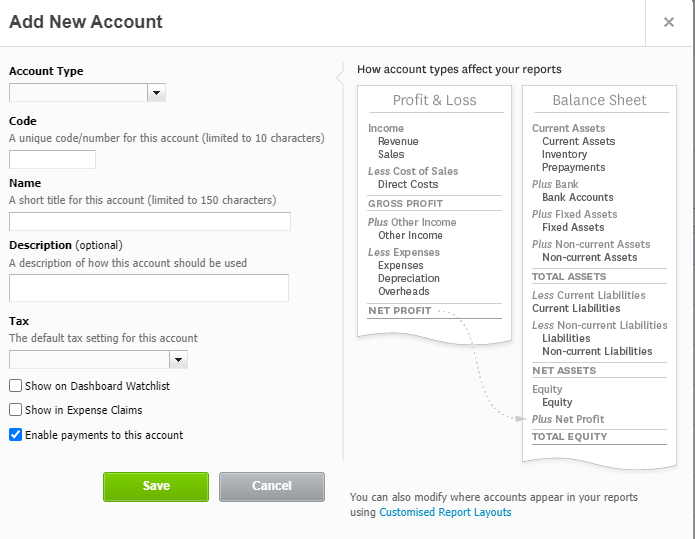
A deposit account cannot be used for payments.
We recommend having the following core payment types enabled:
- Card
- Cash
- Payout
SyncSync The process of fetching the latest data from a connected data source. Syncs can be triggered manually or run automatically on a schedule. for Commerce supports additional payment types that can be switched on as applicable including invoices, specific payment types, or custom types.
Payments account mapping
Codat has provided functionality to allow users to select different accounts for each different payment type.
For card payments, it’s recommended that the merchant creates a clearing account to represent their account with the commerce services provider. The clearing account can be a bank account or a nominal account in Xero that has an Enable payments to this account setting turned on.
If the user starts using other payments types after initial setup, the synchronization will stop until the accounts have been re-mapped via returning to the configuration page.
Codat writes a single payment to Xero per day per payment type which has been used that day.
For example, if the merchant processes ten card payments and twenty cash payments in one day, two payments are written. These payments are recorded against the daily sales invoice (see Sales).
If you are writing Sales and Payments simultaneously, the sales invoices will be written to Xero fully paid (as no further cash is expected from customers).